 |
Instructions for SP2 concurrent connection limit removal |
 |
|
| |
| XP SP2 concurrent connection limit removal tool |
If your operating system is Windows XP SP2, you will find the speed of your P2P software (such as: FunPlayer,BitComet,BitSpirit,PPLive or PPStream etc.)is slow or accelerating slowly. Why?
Because Microsoft has added a new function called “concurrent connection limit” to Windows XP SP2, which greatly affects the P2P applications.
Because SP2 creates Server Pack 2 OOB Message DLL to monitor the concurrent connection attempt of threads of each process at real time, it will block threads which exceed the given safety concurrent connection number, and give out a system warning message. This kind of messages can be found at the listed item named “system” in “control panel->management tools->event logger”; the type of the message is warning, the source is Tcpip, the identity is 4226. Microsoft introduces this function in order to prevent the network collapse caused by worms like Shockwave, but it also acts as P2P software killer.. |
In order to increase the maximum concurrent connection attempts, and then to improve your downloading speed and online video playing experience, it is recommended that you run the “XP SP2 concurrent connection removal tool” to modify the number.
|
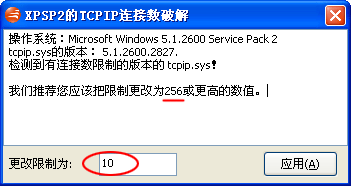
After installed FunPlayer, please click the shortcut, “start->programs-> Funshion->FunPlayer Windows XP SP2 connection cracking program”, to run the program. The you will get the following prompt window:
As shown above, the number in the red circle denotes the concurrent connection attempts of your system, we recommend that you change the number to 256 or higher. To do this, you need to fill the number 256 into the red circle, and click “apply” button. The modification will take effect after the system is restarted. So we strongly recommend you to restart your computer immediately.
|
|
 |
|
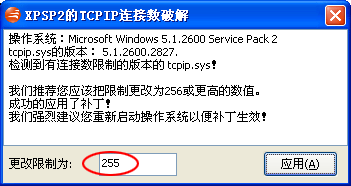 |
After restarting your computer, if you want to know whether or not the connection limit number is really modified, just run the cracking program again, make sure that the number shown in the red circle is the one you modified before restarting.
|
Besides, one thing should be mentioned is that removing connection limit requires to modify the system file TCPIP.SYS. Microsoft does not provide the official tools or ways to modify the connection limit so you must backup the file TCPIP.SYS by hand before you modify it, change it with any non-official tools or methods could probably lead to Windows dysfunction, even disruption. The path where the TCPIP.SYS stored it “SystemDisk:\ Windows\System\Drivers”. For example, your system disk is C: and the position of TCPIP.SYS is “C:\Windows\System\Drivers”. Please copy it to another directory or another logic disk. If there is any problem, you can enter the safe mode of the operating system, copy the backup file to the original place, then restart the computer, and everything will be OK.
|
Another thing is that Windows Update might update TCPIP.SYS automatically, so any modification of the connection limit number on TCPIP.SYS will be reset to its default value (10 concurrent connection attempts). In this case please run the removal tool again.
|
|
|
|
 |
|
 |
|
|
|
|


